AI Inspection Reports
The Inspection Report App That Writes From Your Findings, Not From Thin Air
ProField is an inspection report app for field technicians in any home-service trade. You tap through your checklist, add photos and notes, and the AI writes a customer-ready report in about 30 seconds that you review before it is sent as a signed, branded PDF. It costs $19.99/month with every feature included, after a 14-day free trial with no credit card.


Last updated
Straight answers
What is an inspection report app, and how is ProField different?
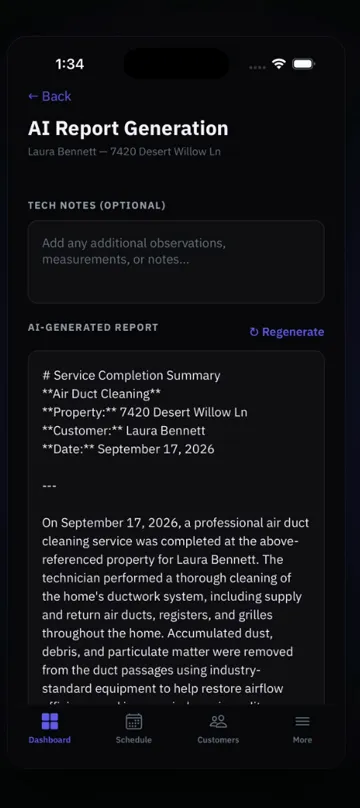
An inspection report app replaces the paper form and the evening spent typing: the technician answers a checklist on the phone, adds photos and readings, and the app produces the report. ProField goes one step further: the AI reads your results, notes and photos and writes the customer-facing narrative in about 30 seconds, from your findings only. You edit it, the customer signs, and a branded PDF is sent from the job site.
Is it also a field report app for jobs that are not inspections?
Yes. Any visit that ends with a document works the same way: a service call, a cleaning, a tune-up, a delivery check. Build the checklist in under 10 minutes for any trade, or we build it for you, free. It costs $19.99/month with every feature included, after a 14-day free trial with no credit card.
How the AI report works
The AI does not invent findings. It writes from exactly what the technician recorded: the checklist results, the numbers with units, the notes, and the photo captions. That is why the narrative sounds like a professional wrote it about this house — because the facts came from the professional who was in it.
- Input: checklist results (pass / fail / N/A), readings with units, multi-select choices, notes, photos.
- Output: a 2–3 paragraph narrative — what was inspected, what was found, what it means, what is recommended.
- Review: the tech reads it on the phone and edits anything before sending. Nothing goes out unread.
- Delivery: the narrative, the color-coded findings table, the photos, and the signature print in a branded PDF.
- Cost: AI-written reports are included in the subscription.
Any trade, any checklist
The AI writes from whatever checklist you run: ready-made checklists for common trades, or build your own in minutes — or ask us to build it. A pool service report, an electrical safety report, and a move-out cleaning report all come from the same engine, each in the language of that trade.
- Pass / Fail / NA, Pass / Fail, and Yes / No items become findings.
- Number fields with units become quoted readings ("static pressure measured at 62 PSI").
- Multi-select fields become lists ("evidence found: droppings, gnaw marks").
- Photo fields print next to the finding they belong to.
- Section results roll up into an overall condition statement.
What the customer receives
A PDF with your logo and contact details in the header, the customer and service address, the narrative, a color-coded findings table, photos with captions, the recommended work, and the customer's signature. It is emailed from the job site and stored on the job for re-sending later.
- Re-share any past report from the app or the web dashboard.
- Attach the estimate for recommended repairs to the same email.
- Reports are tied to the property, so next year's inspection compares to this one.
- Works offline: the checklist, photos, and signature save on the phone; the AI narrative generates when you reconnect.
Pricing
One plan. Everything in it.
14-day free trial. Full access to everything. No credit card.
Every feature included.
Add technicians for $9.99/mo each. Extra locations $10/mo, first one included.
- ✓Every feature included
- ✓AI-written reports included
- ✓Scheduling, estimates, invoices, payments
- ✓Online booking page
- ✓Custom inspection templates for any trade
- ✓Web dashboard for the office
- ✓Works offline, syncs when you reconnect
- ✓iOS and Android apps
The whole platform, phone and web.
Their own login. They see only their assigned jobs.
The first location is included.
Cancel anytime. Subscribing on the web dashboard is cheaper than subscribing in-app on iPhone ($28.99/mo) because of Apple's fee. Your subscription works on both platforms either way.
FAQ
Common Questions
Does the AI make things up?
How long does an AI-generated inspection report take?
Can I edit the AI report?
Is my customer data used to train AI?
Which trades can use AI inspection reports?
Explore ProField
One app for every trade and every job
Trades
Features
Compare
Stop Writing Reports by Hand
14-day free trial. Full access to everything. No credit card..
Start Free Trial Call (888) 885-0440Questions? Send the form — monitored 24/7