Online Booking
Online Booking for Contractors: One Link, Sent by Text
Your customers pick the service and the time on a page with your name on it. The request lands in your app with the address and the details. You approve it, and it is on the schedule with a confirmation sent — no phone tag.


Last updated
How the booking link works
Every ProField account gets a customer-facing booking page. Text the link after a call, put it on your Google Business Profile, your website, your truck. Customers book from their phone without calling.
- Customers choose from the services you enable, with the prices and quantities you set (fixed, starting-at, free, or "call for quote").
- They pick a date and time inside the availability and rules you define.
- They enter the address and contact details once; those become the customer record.
- The request lands in the app and on the web dashboard as a booking request.
- You approve it (or adjust the time), the job is scheduled, and the customer gets a confirmation email.
Booking rules you control
A booking page that lets anyone grab tomorrow at 7 a.m. is worse than a phone call. ProField's rules keep the calendar sane.
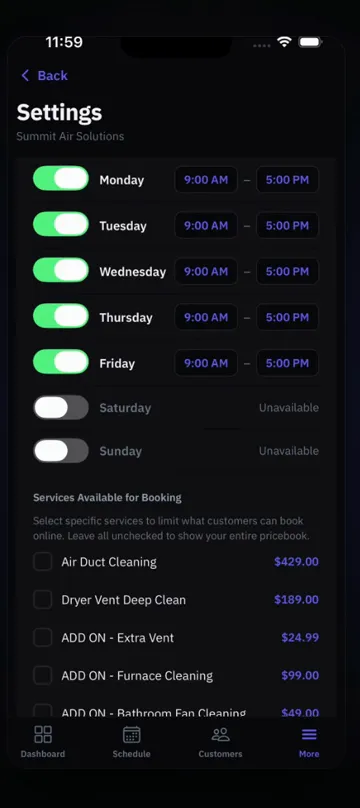
- Buffer days: how far ahead a booking must be.
- Maximum advance days: how far out customers can book.
- Enabled services: only the services you want online.
- Availability: the days and windows customers can pick.
- Approval step: nothing goes on the schedule until you say so.
From booking to report to payment
Booking is the front door of the same workflow as everything else. The approved booking becomes a scheduled job with an assigned tech, the tech runs the checklist for that service, AI writes the report, and the invoice goes out with card, Zelle/Venmo QR, or cash/check.
- Requests show the quoted services and total so approval is one tap.
- Recurring customers book again from the same link.
- Commercial accounts can book too; techs still see only the address.
- Every booking is a customer record with property, history, and reports.
Pricing
One plan. Everything in it.
14-day free trial. Full access to everything. No credit card.
Every feature included.
Add technicians for $9.99/mo each. Extra locations $10/mo, first one included.
- ✓Every feature included
- ✓AI-written reports included
- ✓Scheduling, estimates, invoices, payments
- ✓Online booking page
- ✓Custom inspection templates for any trade
- ✓Web dashboard for the office
- ✓Works offline, syncs when you reconnect
- ✓iOS and Android apps
The whole platform, phone and web.
Their own login. They see only their assigned jobs.
The first location is included.
Cancel anytime. Subscribing on the web dashboard is cheaper than subscribing in-app on iPhone ($28.99/mo) because of Apple's fee. Your subscription works on both platforms either way.
FAQ
Common Questions
Do I need a website for online booking?
Can I stop customers from booking times I do not want?
Can customers see prices when they book?
Does the booking create the customer record?
What does online booking cost?
Explore ProField
One app for every trade and every job
Trades
Features
Compare
Give Customers a Link Instead of a Callback
14-day free trial, every feature, no credit card. Your booking page is live the day you sign up.
Start Free Trial Call (888) 885-0440Questions? Send the form — monitored 24/7