Template
HVAC Service Report Template: Free Format, Filled Example, Printable
Last updated
An HVAC service report is the record of a service call: who came, what system they worked on, what they found, what they did, what parts went in, what the readings were before and after, and what the customer should do next. It is different from an HVAC inspection report, which documents the condition of a system component by component without necessarily doing any work. This page gives you the service report format, a template you can copy or print, and a filled example.
What is the difference between an HVAC service report and an HVAC inspection report?
A service report records a visit where work was done: a repair, a tune-up, a start-up, a part replacement. Its heart is the "work performed" section and the before/after readings that prove the work fixed something. An inspection report records the condition of the system and the recommendations, usually with no repair on the same visit. Many companies use one form for both and tick a box for the visit type. If you only want the condition checklist, use the inspection report template; if your visit ends with a repair or a tune-up, use this one.
What should an HVAC service report include?
- Company and technician. Company name, phone, technician name and license or certification number.
- Customer and site. Name, service address, contact, date, arrival and departure time, visit type (repair, maintenance, start-up, warranty, callback).
- Equipment. Type, brand, model, serial number, approximate age, filter size, refrigerant type from the data plate.
- Customer complaint. The reason for the call in the customer's words: "no cooling upstairs", "loud noise on start-up".
- Diagnosis. What you found and how you confirmed it.
- Work performed. Every action, in order. This is the section customers and warranty departments read first.
- Parts and materials. Part, quantity, part number where relevant.
- Readings before and after. Temperature split, static pressure, voltage, amp draw, capacitor value, refrigerant pressures and superheat/subcool if you charged the system.
- System status at departure. Operating normally, operating with a known issue, or not operating, and why.
- Recommendations. Each with an urgency: immediate, before next season, monitor.
- Photos. The failed part, the data plate, the finished work.
- Signatures. Customer and technician, with dates.
Free HVAC service report template (copy or print)
Copy the block below into your own document, or use the print button for a clean one-page version. Replace the bracketed fields.
HVAC SERVICE REPORT

Company: [Company Name]   Phone: [Phone]
Technician: [Full Name]   License / Cert #: [Number]

─────────────────────────────────────────
Customer: [Full Name]
Service Address: [Street, City, State/Province, Postal Code]
Date: [YYYY-MM-DD]   Arrived: [HH:MM]   Departed: [HH:MM]
Visit Type: [ ] Repair  [ ] Maintenance  [ ] Start-Up  [ ] Warranty  [ ] Callback

─────────────────────────────────────────
EQUIPMENT
Type: [ ] Split  [ ] Package  [ ] Heat Pump  [ ] Furnace  [ ] Mini-Split
Brand / Model: [Brand, Model]   Serial: [Serial]
Approx. Age: [Years]   Filter Size: [Size]   Refrigerant: [Type]

CUSTOMER COMPLAINT
[In the customer's words]

DIAGNOSIS
[What was found and how it was confirmed]

WORK PERFORMED
1. [Action]
2. [Action]
3. [Action]

PARTS & MATERIALS
Qty | Part | Part #
[ ] | [    ] | [    ]
[ ] | [    ] | [    ]

READINGS                     Before      After
Return air temp (°F)          [    ]      [    ]
Supply air temp (°F)          [    ]      [    ]
Temperature split (°F)        [    ]      [    ]
Static pressure (in. WC)      [    ]      [    ]
Voltage (V)                   [    ]      [    ]
Amp draw (A)                  [    ]      [    ]
Capacitor (µF, measured/rated)[    ]      [    ]
Suction / head pressure       [    ]      [    ]
Superheat / subcool           [    ]      [    ]

SYSTEM STATUS AT DEPARTURE
[ ] Operating normally  [ ] Operating with known issue  [ ] Not operating
Notes: [ ]

RECOMMENDATIONS
1. [Recommendation] — [ ] Immediate  [ ] Before next season  [ ] Monitor
2. [Recommendation] — [ ] Immediate  [ ] Before next season  [ ] Monitor

PHOTOS: [ ] Failed part  [ ] Data plate  [ ] Finished work   Count: [ ]

Customer Signature: ____________________  Date: ________
Technician Signature: __________________  Date: ________
Filled example: a no-cooling repair call
Visit type: Repair · Complaint: "AC runs but house will not cool below 78."
Equipment: 3-ton split system, 2014, R-410A, 16x25x1 filter.
Diagnosis: Outdoor fan running, compressor not starting. Dual run capacitor measured 21 µF on a 45 µF rated terminal; contactor pitted but functional.
Work performed: 1. Isolated power at disconnect. 2. Replaced dual run capacitor 45/5 µF. 3. Cleaned condenser coil. 4. Restored power and confirmed compressor start. 5. Checked refrigerant pressures, within range for conditions.
Parts: 1 × dual run capacitor 45/5 µF 440 V.
Readings: Temperature split 4 °F before, 19 °F after. Compressor amp draw 0 A before, 11.8 A after (RLA 14.1).
Status at departure: Operating normally.
Recommendations: Replace contactor before next cooling season (monitor). Replace filter monthly in summer (monitor).
Photos: Old capacitor showing bulged top; data plate; new capacitor installed.
What does a finished HVAC service report look like as a PDF?
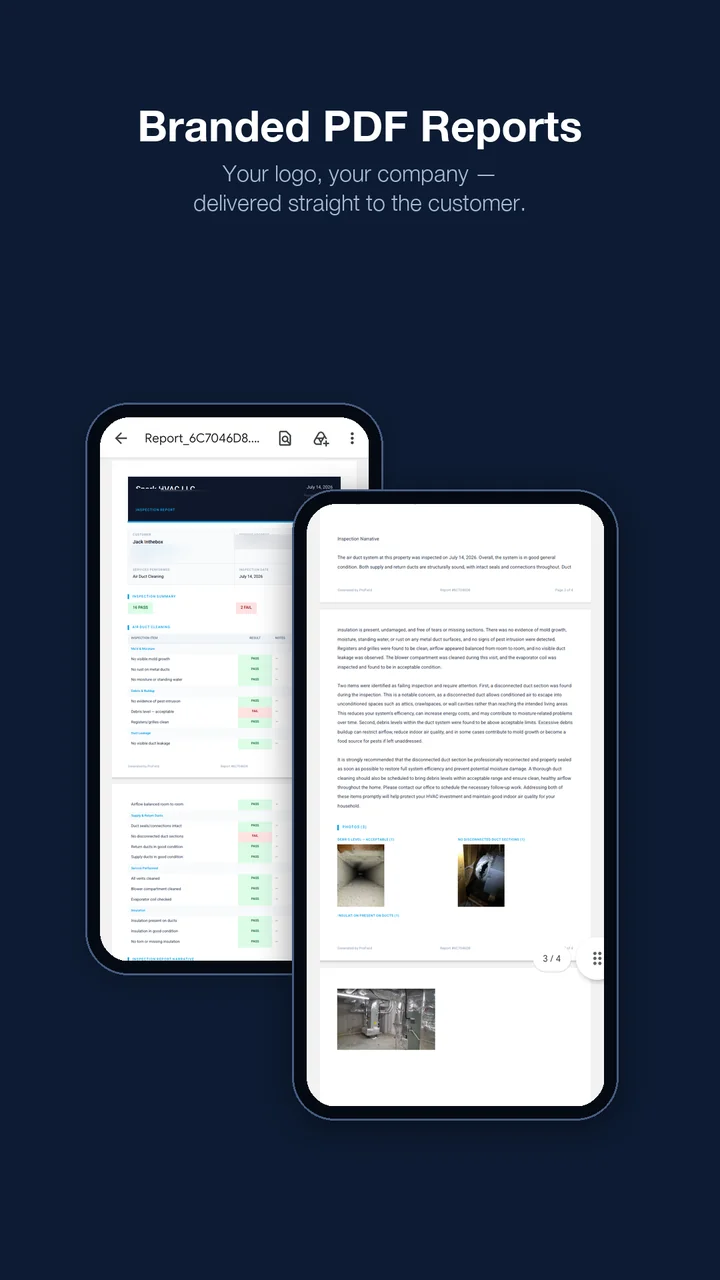
When the report is produced by an app instead of a form, the same content comes out as a branded PDF: your logo and license at the top, the equipment block, the work performed in plain language, the before/after readings in a table, the photos next to the findings they belong to, and the signatures at the bottom. This is what a ProField report looks like:
Build this service report in ProField in about 10 minutes
ProField's HVAC inspection app turns the template above into a tap-through form: yes/no and pass/fail items, numbers with units for every reading, a multi-select for the visit type, text fields for the complaint and diagnosis, photo blocks, and a section result. The technician fills it on the phone, the AI writes the customer-facing summary in about 30 seconds, the customer signs on screen, and the PDF is emailed from the driveway. The same app schedules the call, builds the estimate from your pricebook and sends the invoice. It costs $19.99/month with every feature included, after a 14-day free trial, no credit card. If you would rather not build the form yourself, send us the template and we set it up in your account, free.
Stop retyping service reports.
Build the form once, run it on every call, and the report writes itself.
Start free trial