Features
Everything ProField does
Every feature in the app today, grouped by what it helps you do. Start with a 14-day free trial.


Last updated
AI that does the busy work
Included on Autopilot. On Essentials, add either one on its own.
- AI phone answering: the AI answers your business calls, books the appointment or takes a message, and every call shows up in the inbox with a short summary. A booked call lands in your Online Booking inbox to approve, or straight on the schedule if you turn that on. For US phone numbers, once you are on a paid plan.
- Keep your number: ProField gives you a number for the AI, and you forward the calls you don't answer from your main line. The dashboard shows the forwarding code for your carrier.
- Minutes: Autopilot includes 300 minutes a month, then $0.20 a minute. On Essentials, Starter is $15/month for 50 minutes (then $0.25 a minute) and Pro is $49/month for 300 minutes (then $0.20 a minute).
- AI inspection: talk through the job and take photos, the AI builds the report, you check it, and the customer gets a professional PDF. Included for every technician on Autopilot, $9.99/month per person on Essentials, and in the free trial (10 AI inspections).
- Reports in 13 languages: English, Spanish, Russian, French, Brazilian Portuguese, Vietnamese, Tagalog, Ukrainian, Polish, Italian, German, Turkish and Azerbaijani.
More: AI inspection report app.
Leads, texts and the office
Every lead in one place, and the numbers that tell you how the week went.
- Online Booking inbox: requests from your booking page, your website form, coupons, emails, AI phone calls and texts land in one inbox, each marked with where it came from.
- Two-way texting: text customers from the dashboard and the phone, with the whole conversation on the customer. We register your number with the carriers for you (usually a few business days; $19.50 one-time, plus the carrier's $1.50 to $10 a month, at cost).
- Automatic texts: once texting is on, turn on On my way, Started and Finished texts to the customer.
- Global search: one search box for customers, jobs, estimates and invoices on the web dashboard. Open a customer and their history slides in from the side.
- Home numbers: jobs booked, completed and scheduled, money collected, unpaid invoices, new leads by source, estimates sent and approved, and average job, for any date range from today to this year, with a line per technician. On the phone too.
- Job types and lead sources: tag every job with its type and where the customer came from, and see leads by source on the home numbers.
Getting paid
Card, Zelle, Venmo, cash or check. A deposit before the work, draws on bigger projects, the balance at the end.
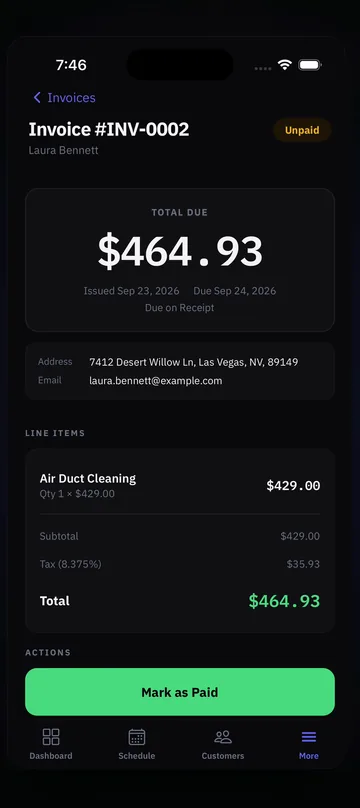
- Card payments by pay link: the customer pays from the link in the invoice email. The money goes to your own account and the invoice marks itself paid. Connect your Stripe account once; the Stripe fee plus a 0.5% platform fee applies.
- Zelle and Venmo (US): your QR code prints on every invoice. Cash and check are recorded with a photo of the receipt.
- Deposits and part payments: ask for part of an invoice as a percent or an amount, with its own pay link.
- Projects with draws: for bigger jobs, one contract invoice with draws such as deposit, materials and final, each with its own pay link. Approved change orders add to the contract total.
- Discounts and fees: named discounts and fees, as a percent or an amount, picked from a saved list. Discounts come off before tax, fees go on after. Prices with cents.
- Sales tax by item: mark each item as service, labor or material, and your business tax rate applies only to the taxable lines.
- Payment terms: due on receipt, Net 15, Net 30 or Net 60.
- Autopay on recurring plans: the customer saves a card once, and each visit or plan bill is charged automatically.
- Know when you are paid: owners and admins get a notification when an invoice is paid. Part-paid invoices show what is paid and what is left.
- Tap to Pay: take cards in person with Tap to Pay on iPhone or Tap to Pay on Android, straight into your own account.
- Paid-invoice email: the customer gets an email when an invoice is paid, however they paid.
- Automatic Google review requests: add your Google review link in Settings, and residential customers get one email asking for a review about two hours after an invoice is paid in full.
Estimates and signatures
Quote it, get it signed, schedule it, without typing anything twice.
- Estimates from your price book: each service can be a fixed price, free, starting at, or call for quote.
- Customers sign estimates: in person on your phone, or online from the Review and sign link in the estimate email. A signed estimate locks; changes go into a revision.
- Approved estimate to job: Schedule as job and choose which lines go into this visit. The rest stay on the estimate for later.
- Projects: on the web dashboard, turn an approved estimate into a project with a contract invoice, draws and change orders.
- Job signatures: the customer approves the work and the price before you start, and signs again when the work is done. Both signatures print on the invoice.
- Estimate requests: a Get an estimate tab on your booking page. Requests land in one inbox, where you create the estimate or schedule the job.
Scheduling and booking
The calendar, the repeat work and the booking page, in one place.
- Schedule: day, week, Monday to Friday and month views on the web dashboard, plus a dispatch view, and a list view on the phone. Assign a technician, or leave the job unassigned until you know who goes.
- View by employee: one row per technician on the day and week views.
- Map of the day: every job on a map with numbered pins.
- Unscheduled drawer: jobs without a date or a technician wait in a drawer next to the calendar until you place them.
- Areas: set service areas by ZIP code, and online bookings match to the technicians who cover that area.
- Auto-schedule online bookings: if you turn it on, a booking goes straight onto the schedule of the matched technician by area and service, instead of waiting for approval.
- Recurring jobs: weekly, every 2 weeks, monthly, quarterly, twice a year, yearly, every 2 or 3 years, or several visits a month. Bill per visit, or a flat monthly, quarterly or yearly amount.
- Skip, move or pause: skip or move a visit on the phone or the web; pause or cancel a plan on the web dashboard. Customers can skip or move a visit from a link in their email.
- Visit reminders: customers get reminder emails before their visits, 30 and 7 days ahead on yearly plans.
- Repeat a job from the field: after finishing a job, a technician can set it to repeat at the same price.
- Change prices on many plans at once: one bulk price change for the plans you pick.
- Order my stops: puts the day’s jobs in driving order, starting and ending at your business.
- Weather on the schedule: rain and snow warnings on days with jobs, for US addresses.
- Move a whole day: move every job on a day to another date in one step.
- Closed dates and holidays: block the days you are closed, including US holidays in one tap.
- Online booking page: priced services, your hours, blocked times and closed dates. Times that are already taken are hidden, and you choose how many jobs can share a time. Same-day booking if you want it.
- Approve and schedule: every booking request waits for you. Change the date, time, technician, services or price, or decline with a reason, and the customer gets an email with the final details.
- Customer notices (optional): On my way, Started and Finished emails to the customer, each one turned on in Settings, and the same as texts once texting is on.
- Job pricing: services, discounts, fees and tax set on the job carry over to the invoice.
Reports
The inspection report your customer keeps, written for you.
- Ready-made forms: for most home-service trades. Not listed? Build your own in minutes, or we build it for you, free.
- Inspection builder: pass/fail, yes/no, numbers with units, multi-select, photos, measurement grids and more, on the phone or the web.
- AI-written reports: the AI writes the narrative from your checklist results and notes in about 30 seconds. You read it, edit it, and your photos print next to each finding.
- Branded PDF: your logo and details, the customer’s signature on screen, emailed from the job site.
- Edit finished reports: fix a finished report and make the PDF again.
- Request details from a customer: send a link, and the customer adds photos and notes before you arrive.
- Inspection to estimate: turn what you found into an estimate straight from the report, on the phone or the web.
- Photos on every job: job photos on the phone and the web dashboard; on the phone you also see past photos from the same address and customer.
- Works offline: inspections, photos and signatures save on the phone and sync when you are back online.
More: AI inspection report app, Inspection checklist builder and every trade.
Team and businesses
From one truck to several companies under one login.
- Roles: owner, admin and technician. Technicians see only their own jobs.
- Technician permissions: choose per technician whether they may create estimates, create invoices and change prices.
- Commercial customers stay private: technicians on a commercial job see only the service address.
- Multiple locations: free, one for every paid technician, plus one.
- Multiple businesses, one login: $10/month per extra business; switch between your businesses, with each team member assigned to the businesses they work for.
- Send work to another business you own: move a job that has not started, an open estimate request or a pending booking to your other business.
- Managers help with billing: admins can update the card and pay bills, and the owner is emailed each time.
- Who stays: when you lower your plan, you choose which team members keep access.
- Your data, your way: CSV import of customers and your price book, invoice CSV export, and analytics on the web dashboard.
More: Field service app for small business and Job management software for trades.
The app
iPhone, Android and the web dashboard, under one account.
- Every platform: the phone app for the field and the web dashboard for the office, with the same login and the same data.
- Light and dark mode: on the phone and the web.
- Updates inside the app: most updates arrive in the app without a store download.
- Call, text or copy: tap a customer’s phone number to call or text from your phone, or copy it.
- Maps: tap an address to open Apple Maps, Google Maps or Waze.
Want texting? We register your number with the carriers for you after you sign up. Email support@getprofield.com to turn it on.
Pricing
Two plans. Start free, pick one later.
14-day free trial. No credit card. 30-day money-back guarantee.
+ $9.99 a month per technician
Locations are free: one for every paid technician, plus one.
- ✓Scheduling, estimates, invoices and payments
- ✓Online booking and the Online Booking inbox
- ✓Inspection checklists and reports
- ✓Two-way texting (we set it up for you)
- ✓Web dashboard for the office
- ✓iPhone and Android apps that work offline
+ $14.99 a month per technician
Locations are free: one for every paid technician, plus one.
- ✓Everything in Essentials
- ✓AI phone answering, 300 minutes a month included (then $0.20 a minute)
- ✓AI inspection for every technician
- AI phone answering, Starter$15 / mo50 minutes included, then $0.25 a minute
- AI phone answering, Pro$49 / mo300 minutes included, then $0.20 a minute
- AI inspection$9.99 / moper person who uses it
Extra business under the same login$10 / moits technicians are billed at your plan's price
Want texting? We register your number with the carriers for you. Then you text customers from the dashboard and the phone, and you can turn on automatic On my way, Started and Finished texts.
- Carrier review and setup$19.50 one-time
- Messaging fee (carrier)$1.50 to $10 / mo
Carrier fees at cost. Registration usually takes a few business days.
Cancel anytime. 30-day money-back: ask within 30 days of starting, before your second payment, and we refund you in full. You pick a plan on the web dashboard, and it works on iPhone, Android and the web. AI phone answering is for US phone numbers and starts once you are on a paid plan.
FAQ
Common Questions
Does my plan include every feature?
Which features are on the phone and which on the web?
Is AI phone answering in the free trial?
Do I have to use every feature?
Explore ProField
One app for every trade and every job
Trades
Features
Compare
Run the Whole Day From One App
14-day free trial, every feature, no credit card. Call if you want your checklist built for you.
Start Free Trial Call (888) 885-0440Questions? Send the form (monitored 24/7)