Progress billing
Progress billing for contractors, one draw at a time
Get paid as the job moves: a deposit before you order materials, a draw when the materials land, and the final payment when the work is done. Each payment has its own pay link, and the customer always sees what is paid and what is left.


Last updated
Why progress billing matters on bigger jobs
On a two-hour service call you invoice at the end. On a roof, a remodel or a new system install, waiting until the end means you carry the cost of materials and labor for weeks. Progress billing splits the price into stages that follow the work, so the money comes in while the job is still running.
Smaller jobs: an invoice with a deposit
Not every job needs a draw schedule. For a water heater swap or a duct system cleaning, a deposit on the invoice is enough.
- Percent or amount: ask for part of an invoice as a percent or a dollar amount.
- Give it a name: call it "Deposit" or anything else, so the customer knows what the payment is for.
- Its own pay link: each part payment has a pay link you email, or copy and share from your phone.
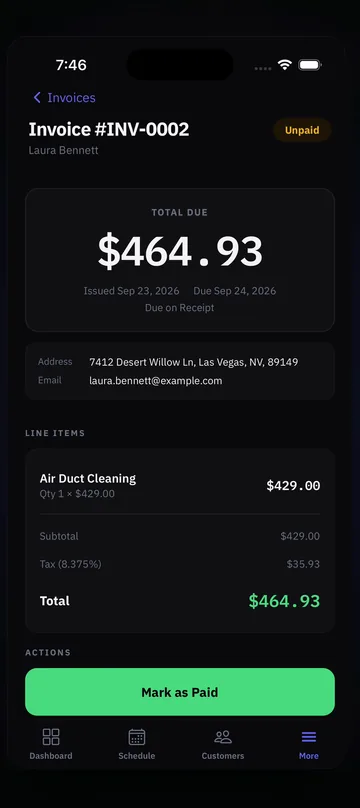
- Paid and left: part-paid invoices show what is paid and what is left, and owners and admins get a notification when an invoice is paid.
Card payments go to your own account. Connect your Stripe account once; the Stripe fee plus a 0.5% platform fee applies. Zelle and Venmo QR codes (US), cash and check work too.
Bigger jobs: a project with a draw schedule
A project holds one contract invoice with draws. Each draw, such as deposit, materials and final, has its own pay link, so the customer pays one stage at a time.
Start from an approved estimate
On the web dashboard, use Convert to project on an approved estimate. You can also convert a job or an invoice.
One contract invoice
The whole price lives on one progress invoice, with each draw listed on it.
A pay link per draw
Request a draw when that stage is due. Owners and admins can request draws from the phone too.
Change orders add up
When the customer approves a change order, it adds to the contract total.
Projects work for residential and commercial customers. On commercial jobs, technicians see only the service address.
A worked example: a $12,000 roof
This is an example to show how a draw schedule reads. Your stages and amounts are your call. Numbers are before tax to keep it simple.
- The estimate: a $12,000 roof replacement. The homeowner signs the estimate on your phone, or online from the Review and sign link in the email.
- Convert to project: on the web dashboard, the approved estimate becomes a project with one contract invoice for $12,000.
- Draw 1, deposit (30%): $3,600 before the tear-off is scheduled. The customer pays from the pay link.
- Draw 2, materials (40%): $4,800 when the shingles and underlayment are delivered.
- Draw 3, final (30%): $3,600 when the roof is done and the customer signs that the work is completed.
- A change order: the crew finds rotted decking. The customer approves an $800 change order, and the contract total becomes $12,800.
The contract invoice shows what is paid and what is left at every step.
Signatures at every step
Written approval protects you when the job is big and the money comes in stages.
- Signed estimate: a signed estimate locks. If the scope changes, the change goes into a revision, so the signed version stays as it was.
- Before the work: the customer signs that they approve the work and the price.
- After the work: the customer signs that the work is completed. Both job signatures print on the invoice.
For the estimate side, see estimate software for contractors. For everyday invoicing, see the estimate and invoice app. Roofers can start with the roof inspection app, and every tool is listed on all features.
Pricing
Two plans. Start free, pick one later.
14-day free trial. No credit card. 30-day money-back guarantee.
+ $9.99 a month per technician
Locations are free: one for every paid technician, plus one.
- ✓Scheduling, estimates, invoices and payments
- ✓Online booking and the Online Booking inbox
- ✓Inspection checklists and reports
- ✓Two-way texting (we set it up for you)
- ✓Web dashboard for the office
- ✓iPhone and Android apps that work offline
+ $14.99 a month per technician
Locations are free: one for every paid technician, plus one.
- ✓Everything in Essentials
- ✓AI phone answering, 300 minutes a month included (then $0.20 a minute)
- ✓AI inspection for every technician
- AI phone answering, Starter$15 / mo50 minutes included, then $0.25 a minute
- AI phone answering, Pro$49 / mo300 minutes included, then $0.20 a minute
- AI inspection$9.99 / moper person who uses it
Extra business under the same login$10 / moits technicians are billed at your plan's price
Want texting? We register your number with the carriers for you. Then you text customers from the dashboard and the phone, and you can turn on automatic On my way, Started and Finished texts.
- Carrier review and setup$19.50 one-time
- Messaging fee (carrier)$1.50 to $10 / mo
Carrier fees at cost. Registration usually takes a few business days.
Cancel anytime. 30-day money-back: ask within 30 days of starting, before your second payment, and we refund you in full. You pick a plan on the web dashboard, and it works on iPhone, Android and the web. AI phone answering is for US phone numbers and starts once you are on a paid plan.
FAQ
Common Questions
What is progress billing?
How do I set up a draw schedule?
Can I just take a deposit on a normal invoice?
Can I request a draw from my phone?
What happens when the customer approves a change order?
Explore ProField
One app for every trade and every job
Trades
Features
Compare
Run the Whole Day From One App
14-day free trial, every feature, no credit card. Call if you want your checklist built for you.
Start Free Trial Call (888) 885-0440Questions? Send the form, monitored 24/7