Scheduling
Job scheduling software for small crews
One schedule for the office and the truck. Plan the week on the web dashboard, run the day from the phone, and let customers request times from your booking page.


Last updated
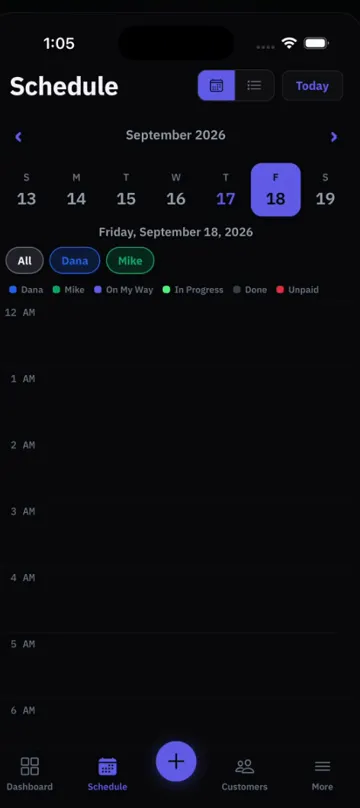
A calendar for the office, a list for the truck
Field service scheduling software should fit how the day actually runs. The person planning sits at a screen; the tech needs to know where to go next.
- Day, week and month: on the web dashboard, see the whole team for a day, a week or a month.
- List view on the phone: technicians open the app and see their jobs, with the address one tap from Apple Maps, Google Maps or Waze.
- Assign or leave open: assign a technician to a job, or leave it unassigned until you know who goes.
- Techs see their own jobs: technicians see only the jobs assigned to them. Owners and admins see everything.
Plan the day, move the day
The schedule rarely survives the morning. These tools handle the usual changes.
Order my stops
Puts the day’s jobs in driving order, starting and ending at your business location. On the phone and the web.
Rain and snow warnings
Days with jobs show rain and snow warnings for US addresses, so a roof or exterior job does not catch you by surprise.
Move a whole day
Weather or a sick tech? Move all of a day’s jobs in one step instead of one by one.
Closed dates and holidays
Block the days you are closed, including US holidays in one tap. Closed days are blocked on your booking page too.
If you searched for dispatch software, this is how a small crew dispatches in ProField: assign the tech on each job, then use Order my stops to set the route for the day.
Booking requests that wait for you
Your online booking page shows your priced services, your hours, blocked times and closed dates. Times already taken are hidden, and you set how many jobs can share a time. Same-day booking is possible if you set the lead time to allow it.
- Every request waits: nothing lands on the calendar until you approve it.
- Approve and schedule editor: change the date, time, technician, services or price before you approve, or split it into more than one visit.
- Warnings: the editor warns you when a day is fully booked or closed.
- Decline or confirm: decline with a reason, or approve, and the customer gets an email with the final time and details.
More on the booking page: online booking for contractors.
Recurring visits on the same schedule
Maintenance work shows up next to one-off jobs, so you see the real load for the week.
- Recurring jobs: weekly to every 3 years, or 2 to 8 visits a month. Each visit appears on the schedule with its technician.
- Skip or move a visit: on the phone or the web, and customers can skip or move a visit from a link in their email.
Plans, billing and reminders are on recurring service plans.
Keep the customer in the loop, and the price on the job
A scheduling app for contractors is only half done if the price and the customer updates live somewhere else.
- Optional customer notices: On my way, Started and Finished emails. Each one is off until you turn it on in Settings.
- Job pricing: services, item types, tax, discounts and fees set on the job carry over to the invoice.
- Job signatures: the customer approves the work and price before you start, and signs when the work is done.
- Works offline: inspections, photos and signatures save on the phone and sync when you are back online.
See everything else on all features. Cleaning and lawn crews can start with the cleaning business app or the lawn care app.
Pricing
Two plans. Start free, pick one later.
14-day free trial. No credit card. 30-day money-back guarantee.
+ $9.99 a month per technician
Locations are free: one for every paid technician, plus one.
- ✓Scheduling, estimates, invoices and payments
- ✓Online booking and the Online Booking inbox
- ✓Inspection checklists and reports
- ✓Two-way texting (we set it up for you)
- ✓Web dashboard for the office
- ✓iPhone and Android apps that work offline
+ $14.99 a month per technician
Locations are free: one for every paid technician, plus one.
- ✓Everything in Essentials
- ✓AI phone answering, 300 minutes a month included (then $0.20 a minute)
- ✓AI inspection for every technician
- AI phone answering, Starter$15 / mo50 minutes included, then $0.25 a minute
- AI phone answering, Pro$49 / mo300 minutes included, then $0.20 a minute
- AI inspection$9.99 / moper person who uses it
Extra business under the same login$10 / moits technicians are billed at your plan's price
Want texting? We register your number with the carriers for you. Then you text customers from the dashboard and the phone, and you can turn on automatic On my way, Started and Finished texts.
- Carrier review and setup$19.50 one-time
- Messaging fee (carrier)$1.50 to $10 / mo
Carrier fees at cost. Registration usually takes a few business days.
Cancel anytime. 30-day money-back: ask within 30 days of starting, before your second payment, and we refund you in full. You pick a plan on the web dashboard, and it works on iPhone, Android and the web. AI phone answering is for US phone numbers and starts once you are on a paid plan.
Dispatch views for the office
Built for the person who runs the board.
- View by employee: one row per technician on the day and week views, so you see who is free at a glance.
- Map of the day: every job on a map with numbered pins.
- Unscheduled drawer: jobs without a date or a technician wait next to the calendar until you place them.
- Areas: set service areas by ZIP code; online bookings match to the technicians who cover them.
- Auto-schedule online bookings: turn it on and a booking goes straight onto the matched technician’s schedule instead of waiting for approval.
- Global search: find any customer, job, estimate or invoice from one box, and open the customer in a side panel.
FAQ
Common Questions
What is the best job scheduling software for a small business?
Can technicians see other technicians’ jobs?
Does ProField plan the route for the day?
Can customers book themselves?
Can I move jobs when the weather turns?
Explore ProField
One app for every trade and every job
Trades
Features
Compare
Run the Whole Day From One App
14-day free trial, every feature, no credit card. Call if you want your checklist built for you.
Start Free Trial Call (888) 885-0440Questions? Send the form, monitored 24/7